tailwindcss 에서 미리 기 정의된 color 프리셋을 제공한다. font, background 등등. 다만 기존에 사용하던 색상들을 tailwindcss 체계에 녹이고 싶다.
text-black | color: var(--color-black); /* #000 */ |
|---|---|
text-white | color: var(--color-white); /* #fff */ |
text-red-50 | color: var(--color-red-50); /* oklch(0.971 0.013 17.38) */ |
비슷한 형태로, 우리의 color 프리셋을 사용해보자.
font color preset custom
 tailwindcss.com
color - Typography
Utilities for controlling the text color of an element.
<p class="text-[#50d71e] ..."></p>
<p class="text-(--my-color) ..."></p>
이런식으로 color 코드를 직접 넣거나, variables 를 지정하면 커스텀 컬러를 사용할 수 있다. 하지만 나는 text-error-90 형식으로 사용하고 싶다.
customizing theme
테마를 수정하는 방식을 제공한다.
tailwindcss.com
color - Typography
Utilities for controlling the text color of an element.
tailwindcss.com
Theme variables - Core concepts
Using utility classes as an API for your design tokens.
@theme {
  --color-base-10: #FFFFFF;
  --color-base-20: #F8F8F9;
  --color-base-30: #ECEDF0;
  ...
}
<p class="text-base-30"></p>
text-base-30 bg-base-30 이런식으로 색상을 사용할 수 있게 된다. tailwindcss 가 변수를 읽어 자동으로 utility class 를 생성해준다.
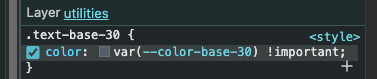
오오

stackoverflow.com
How to use custom color themes in TailwindCSS v4
My tailwind.config.js in v3 looks like this, but I can't find a way to use it in v4:theme: { extend: { colors: { lightHover: '#fcf4ff', darkHover: '#2a004a', darktheme: '#1...
다음은 테마를 적용해보자.
@custom-variant dark (&:where(.dark, .dark *));
@theme {
  --color-custom-10: #FFFFFF;
  --color-custom-20: #F8F8F9;
  --color-custom-30: #ECEDF0;
    ...
}
@variant dark {
  --color-custom-10: #0D152A;
  --color-custom-20: #303445;
  --color-custom-30: #555C6C;
    ...
}
이렇게 @variant dark 로 컬러를 선언해주면, @custom-variant dark 에 의해서, .dark 클래스 아래의 요소들은 variables 가 갈아끼워진다.
<html class="dark"></html>
위 형태로 html 태그의 클래스에 dark 가 포함되면, @variant dark 의 변수들이 사용되는 구조이다.
<div class="text-custom-70 dark:text-custom-50">test color tailwindcss</div>
<div class="text-custom-70">test color tailwindcss</div>
tailwindcss 에서는 dark mode 일 때는 dark:bg-base-10 이런식으로 특정 조건일 때 클래스를 적용할 수 있도록 기능을 제공한다.
dark:* 로 dark 모드일 때 데이터를 지정하여, dark 모드가 되었을 때 70 이 아닌 50을 사용하겠다는 뜻이 된다. 다만, dark 모드로 갈아끼워진 variable 의 50을 사용하게 되는 것을 주의해야 한다.
/**
 * # 테마 컬러를 변경한다.
 */
function changeTheme(theme: ColorTheme) {
    document.documentElement.classList.remove(...["dark-mode", ...]);
    if (theme === ColorTheme.DARK) {
        document.documentElement.classList.add("dark-mode");
    } else if (theme === ColorTheme.SOMETHEME) { ... }
    localStorage.setItem(STORAGE_KEY, theme);
    colorTheme.value = theme;
}
테마 변경을 body 의 클래스로 활용했었다. html 태그의 클래스를 바꿔주기 위해서 대상을 document.documentElement 로 변경해주었다. @variant 는 html 태그의 클래스를 인식한다.
vue3 에서 css variables 값 가져오기
www.reddit.com
Reddit - The heart of the internet
const root = document.querySelector(':root');
if(root) {
    return {
        100: getComputedStyle(root).getPropertyValue(`--color-${p}-100`),
        ...
    };
}
@variant 로 지정한 테마의 색상 변수는 :root 요소를 찾아야 한다. 계산된 style 을 찾아서 변수의 값을 가져오자.
댓글 0개