developer.mozilla.org
Element: getBoundingClientRect() method - Web APIs | MDN
The Element.getBoundingClientRect() method returns aDOMRect object providing information about the size of an element and itsposition relative to the viewport.
실제 뷰포트의 너비와 높이를 구할 때는 브라우저나 호환성을 고려해서 여러 값을 조합해서 사용한다.
const viewportWidth = window.innerWidth
  || document.documentElement.clientWidth
  || document.body.clientWidth;

const viewportHeight = window.innerHeight
  || document.documentElement.clientHeight
  || document.body.clientHeight;
| 속성 | 설명 |
|---|---|
window.innerWidth / innerHeight | 현재 브라우저 뷰포트 크기 (스크롤바 너비 포함, 브라우저 툴바/주소창 제외) |
window.outerWidth / outerHeight | 브라우저 창 전체의 물리적 크기 (윈도우 테두리, 주소창, 툴바 등 포함) |
document.documentElement.clientWidth / clientHeight | 스크롤바 너비를 제외한 뷰포트 영역 크기 |
document.body.clientWidth / clientHeight | 실제 렌더링된 문서 body 요소의 크기 |
screen.width / height | 모니터 기기 전체의 해상도 수치 |
getBoundingClientRect
특정 요소를 기준으로 오버레이나 툴팁을 배치하려면 현재 뷰포트를 기준으로 요소의 위치와 크기를 반환하는 getBoundingClientRect() 메서드를 사용하는 게 좋다.
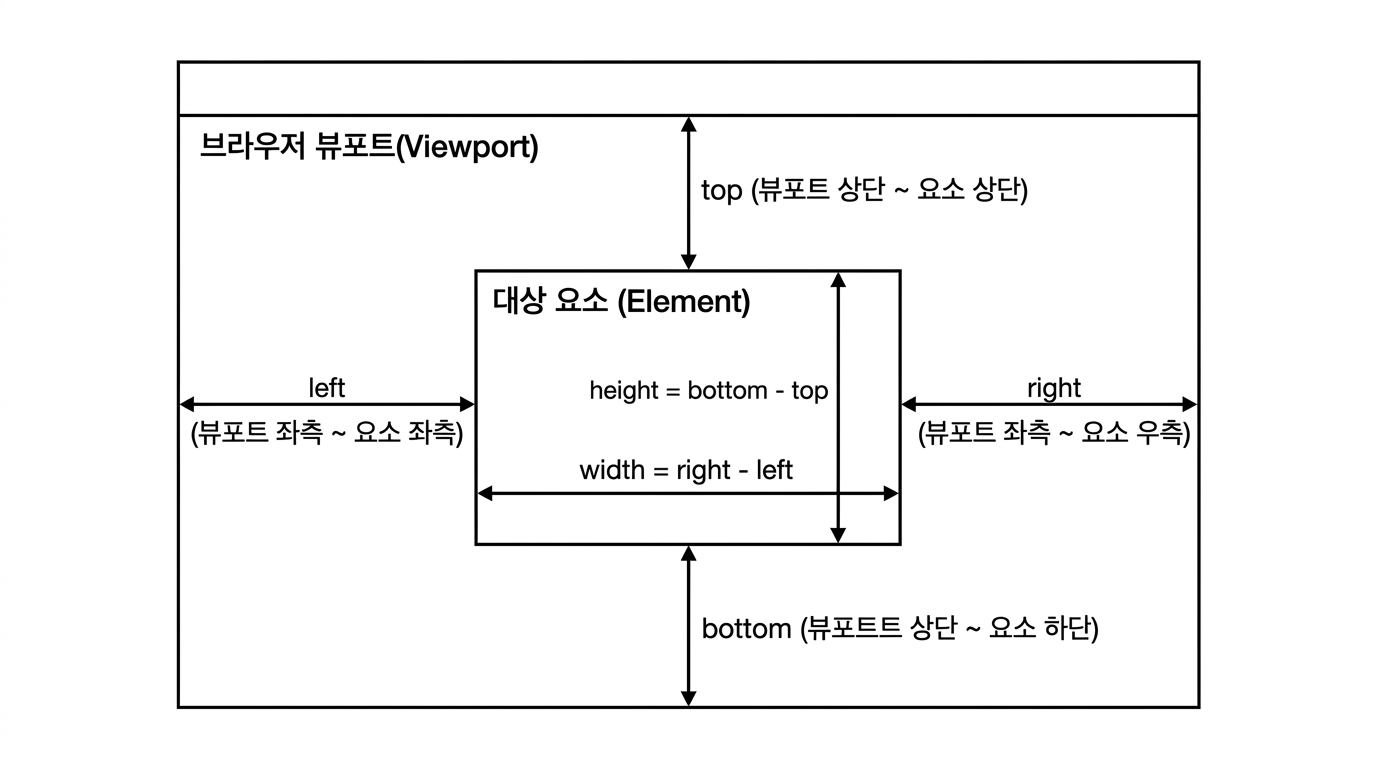
getBoundingClientRect()는 뷰포트 좌측 상단을 (0, 0)으로 하는 DOMRect 객체를 반환한다.
주의: 요소에
display: none이 적용되어 있으면 모든 좌표와 크기 값이 0으로 반환된다.
const target = document.getElementById("target-element");
const rect = target.getBoundingClientRect();

console.log(rect.top);    // 뷰포트 상단에서 요소 상단까지의 거리
console.log(rect.left);   // 뷰포트 좌측에서 요소 좌측까지의 거리
console.log(rect.width);  // 요소의 실제 렌더링 너비 (border, padding 포함)
console.log(rect.height); // 요소의 실제 렌더링 높이
transform 적용 시 주의점
getBoundingClientRect()는 scale, rotate 등의 transform이 적용된 최종 변형 영역 크기를 반환한다. 변형 전 요소의 본래 레이아웃 크기가 필요한 경우에는 offsetWidth / offsetHeight를 사용해야 한다.
절대 좌표 계산 (문서 전체 기준)
페이지 스크롤이 발생하더라도 문서 전체(Document Root) 기준의 절대 Y축 위치를 구하고 싶다면, rect.top에 현재 페이지의 스크롤 위치(window.scrollY)를 더해준다.
const absoluteTop = rect.top + window.scrollY;
const absoluteLeft = rect.left + window.scrollX;
getBoundingClientRect 단점과 리플로우 저하
window.onscroll이나 window.onresize 같이 단기간에 많이 발생하는 이벤트 핸들러에서 getBoundingClientRect()나 offsetWidth/offsetHeight 같은 동적 수치를 읽으면 성능 저하가 발생할 수 있다. 값을 측정하는 순간 모든 레이아웃 변경 사항을 즉시 계산하는 Forced Synchronous Layout(강제 동기 리플로우)이 유발되기 때문이다.
따라서 다음 경우에는 전용 API나 기법을 사용하는 편이 낫다.
- 단순 시각적 교차 감지 시:
IntersectionObserver사용 - 요소 크기 변화 감지 시:
ResizeObserver사용 - 스크롤 이벤트 내부 사용 시:
requestAnimationFrame또는 쓰로틀/Debounce 적용
댓글 0개