
같은 사이트여도 탭 사이에 통신이 필요할 때가 있다. 한 탭에서 로그아웃하거나 데이터를 변경한 뒤 다른 탭에도 알려야 하는 상황이다. 메시지를 전달하는 방법은 대상 범위에 따라 나뉜다. 여러 탭에 알릴 때는 storage 이벤트나 BroadcastChannel을 사용하고, Origin이 다른 팝업이나 iframe과 통신할 때는 window.postMessage()를 사용한다. Worker를 Same-Origin 컨텍스트의 중계 지점으로 사용할 수도 있다.
| 방법 | 전달 대상 | Window reference | 데이터 저장 | Cross-Origin |
|---|---|---|---|---|
storage 이벤트 | Same-Origin의 다른 탭과 창 | 필요 없음 | localStorage에 남음 | 불가 |
BroadcastChannel | 같은 Storage Partition과 Origin을 공유하는 탭, 창, iframe, Worker | 필요 없음 | 남지 않음 | 불가 |
window.postMessage() | Window reference가 있는 팝업이나 iframe | 필요 | 남지 않음 | 가능 |
| Service Worker 중계 | Worker가 제어하거나 조회한 클라이언트 | Worker가 조회 | 남지 않음 | Same-Origin |
localStorage 변경 감지
developer.mozilla.org
Window: storage event - Web APIs | MDN
The storage event of the Window interface fires when another document that shares the same storage area (either localStorage or sessionStorage) as the current window updates that storage area. The event is not fired on the window that made the change.
localStorage.setItem(
  'session:state',
  JSON.stringify({ status: 'signed-out', changedAt: Date.now() }),
)

applySignedOutState()
어떤 탭에서 로그아웃을 하면,
window.addEventListener('storage', (event) => {
  if (event.storageArea !== localStorage) return
  if (event.key !== 'session:state' || event.newValue === null) return

  const state = JSON.parse(event.newValue)

  if (state.status === 'signed-out') {
    applySignedOutState()
  }
})
storage 이벤트로 다른 탭에서 받을 수 있다. 값을 바꾼 탭에는 이벤트가 전달되지 않는다. 이벤트에는 key, oldValue, newValue, storageArea, 트리거된 url이 담긴다. 일회성 메시지보다 로그인 상태나 사용자 설정처럼 저장할 값의 동기화할 때 사용하는 게 좋다. 같은 값을 다시 저장하면 변경이 없어 이벤트를 발송하지 않아서 로직 실행이 불가능하다.
BroadcastChannel
developer.mozilla.org
Broadcast Channel API - Web APIs | MDN
The Broadcast Channel API allows basic communication between browsing contexts (that is, windows, tabs, frames, or iframes) and workers on the same origin.
const channel = new BroadcastChannel('session-events')

channel.addEventListener('message', (event) => {
  if (event.data?.type === 'SIGNED_OUT') {
    applySignedOutState()
  }
})

function signOut() {
  applySignedOutState()
  channel.postMessage({ type: 'SIGNED_OUT' })
}

window.addEventListener('pagehide', () => channel.close(), { once: true })
같은 이름으로 만든 채널은 같은 도메인의 창, 탭, iframe과 Worker 모두 메세지를 받을 수 있다.
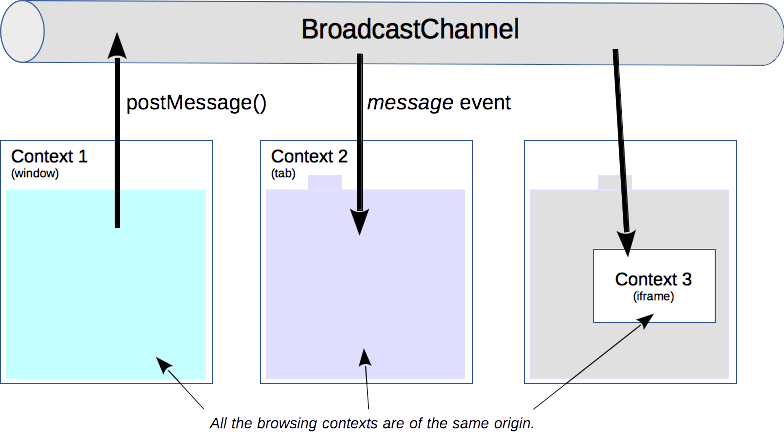
메시지를 보낸 BroadcastChannel 객체는 자신의 메시지를 다시 받진 않는다. 채널을 더 쓰지 않을 때 close()를 호출하면 해당 객체가 채널에서 빠진다.
window.postMessage
const authWindow = window.open('https://auth.example.com/login')

authWindow?.postMessage(
  { type: 'SESSION_REQUEST' },
  'https://auth.example.com',
)
window.open()으로 연 팝업에 메세지를 보낸다. 같은 도메인이 아니어도 사용할 수 있다는 점이 강점이다.
window.addEventListener('message', (event) => {
  if (event.origin !== 'https://auth.example.com') return
  if (event.source !== authWindow) return
  if (event.data?.type !== 'SESSION_RESULT') return

  updateSession(event.data.session)
})
message 이벤트로 동일하게 받지만 다른 도메인도 가능하다는 게 BroadcastChannel 과 다른 점이다. 대신 수신 측에서는 origin만 확인하고 끝내지 않고, 예상한 Window가 맞는지 source와 메시지 구조 등등 종합적으로 검토해야 보안에 문제가 없을듯.
developer.mozilla.org
Window: postMessage() method - Web APIs | MDN
The window.postMessage() method safely enables cross-origin communication between Window objects; e.g., between a page and a pop-up that it spawned, or between a page and an iframe embedded within it.
송신할 때 targetOrigin을 *로 두면 메시지를 받을 문서의 Origin을 제한하지 못한다. 대상 Origin을 알고 있다면 scheme, host, port를 포함한 정확한 값을 지정하는 게 좋다.
사용자가 주소창이나 북마크로 직접 연 임의의 탭은 Window reference가 없으므로 전달이 불가능하다. 이 경우는 BroadcastChannel이나 storage 이벤트를 쓰는 게 맞다.
Service Worker를 활용한 통신
developer.mozilla.org
ServiceWorker - Web APIs | MDN
The ServiceWorker interface of the Service Worker API provides a reference to a service worker. Multiple browsing contexts (e.g., pages, workers, etc.) can be associated with the same service worker, each through a unique ServiceWorker object.
Service Worker를 이미 등록한 앱에서 푸시나 백그라운드 이벤트를 열려 있는 탭에 알릴 때 사용할 수 있다.
// page.ts
navigator.serviceWorker.controller?.postMessage({
  type: 'BROADCAST',
  payload: { type: 'CONTENT_UPDATED' },
})

navigator.serviceWorker.addEventListener('message', (event) => {
  if (event.data?.type === 'CONTENT_UPDATED') {
    refreshContent()
  }
})
서비스 워커에 메세지를 보내고, message 이벤트로 받는다.
// service-worker.js
self.addEventListener('message', (event) => {
  if (event.data?.type !== 'BROADCAST') return

  event.waitUntil(
    self.clients.matchAll({ type: 'window' }).then((clientList) => {
      for (const client of clientList) {
        if (client.id !== event.source?.id) {
          client.postMessage(event.data.payload)
        }
      }
    }),
  )
})
clients.matchAll()은 기본적으로 현재 Service Worker가 제어하는 모든 클라이언트를 반환한다. includeUncontrolled: true를 지정하면 같은 도메인이지만 아직 워커의 제어를 받지 않은 클라이언트까지 조회할 수 있다.
탭 통신만을 위해 Service Worker를 새로 도입하면 등록과 활성화, 제어 범위와 갱신 수명 주기까지 관리해서 비추
댓글 0개