css
--color-base-20: #ddd;
이런식으로 정의한 컬러 코드 값의 변수로 배경에 투명도를 섞어서 사용할 일이 생겼다.
css
background-color: rgba(--color-base-20, 0.5);
background-color: rgba(var(--color-base-20), 0.5);
background: var(--color-base-20) rgba(0, 0, 0, 0.5);
등 다양한 형태로 사용해봤지만, 모두 작동하지 않는다. hex 형태의 컬러코드는 rgba 에서 사용이 불가능하다.
css
--color-base-20: 240, 240, 240;
background-color: rgba(var(--color-base-20), 0.5);
변수를 rgb 값을 찢어놓는 방법도 있다. 그런데 기존 변수들은 건들고 싶지 않았다.
color-mix

 developer.mozilla.org
color-mix() - CSS: Cascading Style Sheets | MDN
The color-mix() functional notation takes two <color> values and returns the result of mixing them in a given colorspace by a given amount.
css
background-color: color-mix(in srgb, var(--color-base-20), #0000 50%);
이렇게 색상을 섞을 수 있는 mixin 이 있다.
- 타입 : hsl, lch, srgb, lab, custom-color-space
- 색상 : 색상 %
투명도만 주고 싶은 경우이기 때문에, 첫번째 색상은 원본 색상을 주고, 두번째는 완전 투명한 색상에 투명도를 50%로 주어서 섞었다. 그럼 rgba(--var, 0.5) 와 동일한 효과가 된다.
 caniuse.com
"color-mix" | Can I use... Support tables for HTML5, CSS3, etc
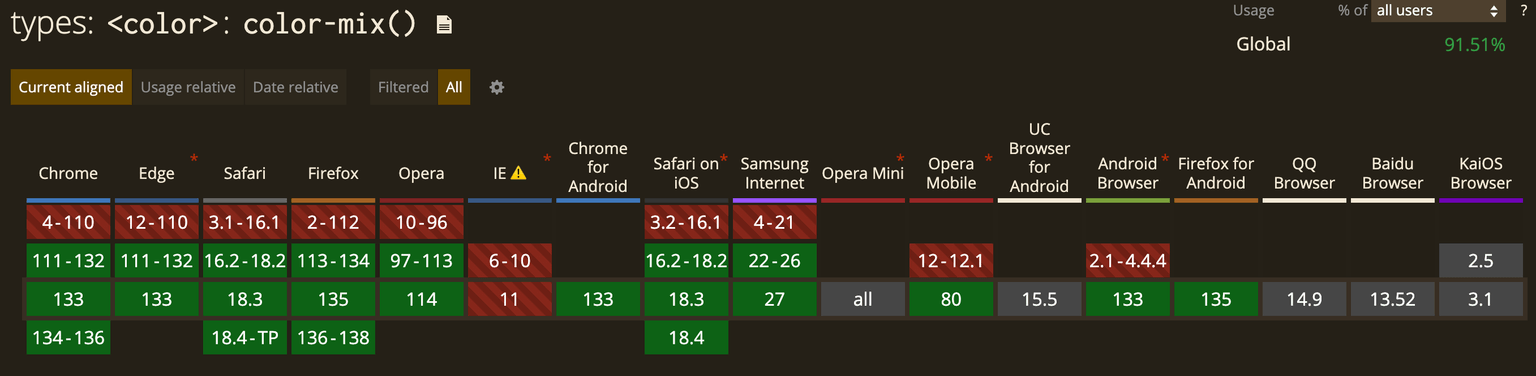
웬만하면 다 쓸 수 있는듯~
tailwindcss 를 사용하면 --alpha() 를 사용할 수 있다
 tailwindcss.com
Functions and directives - Core concepts
A reference for the custom functions and directives Tailwind exposes to your CSS.
css
.my-element {
  color: --alpha(var(--color-lime-300) / 50%);
}
/* compiled css */
.my-element {
  color: color-mix(in oklab, var(--color-lime-300) 50%, transparent);
}
결국 css 로 컴파일되면 color-mix 이긴 하다.
댓글 0개